
Your suppliers provide their emissions results once. You are granted access to what they share with you.
Collecting supplier emissions data often means asking each supplier for the same figures, in different formats. Here you invite your immediate suppliers. Each imports a result already calculated elsewhere, as a CSV or by manual entry, and you see what they share with you in one inventory.
Inviting suppliers and viewing their shared results needs your organisation’s own paid licence for that financial year.
How access works
- Request access.
- Confirm your work email.
- We contact your organisation to confirm you represent it.
- We quote only after that confirmation.
- An admin approves or rejects the request. A rejected request does not become a paid year.
- After approval, an admin marks a financial year paid for a seat count.
- You can then invite suppliers for that year while a seat is available.
Proof points
Results calculated elsewhere
Your suppliers import results already calculated elsewhere, as a CSV or by manual entry. Suppliers choose the result version and allocation percentage to share with a buyer that invited them. The percentage is a share of production volume.
You work with the shares attached to you
Your own totals count only the shares made directly to you. Upstream tiers you open with available seats are shown separately. Other customers stay hidden.
An input to your own measurement
The export is an input to your own emissions measurement, not a completed Scope 3 inventory or sustainability report. You remain responsible for coverage, category assignment, quality review and reporting. Exports are recorded in the audit trail.
What you see, and what you control
You see the results your immediate suppliers share with you, after you accept them, for a financial year marked paid. A year that is not marked paid hides the figures. You can open a further tier upstream only with enough available seats for that supplier’s direct-supplier count; those results are shown separately and stay out of your own total. Each organisation shares only its own result.
Access and year licences
After you request access, you confirm your work email. We then contact your organisation to confirm you represent it. We quote only after that confirmation. If that confirmation is not made, the request is rejected and no quote is sent. An admin approves or rejects the request. After approval, an admin marks a financial year paid for a seat count. You can then invite suppliers for that year while a seat is available.
A year licence is a seat count for one Australian financial year, from 1 July to 30 June. The year stays open after it ends, so suppliers can keep sharing into it. It stays open until the 30 June one year after it ends, then locks. While a year is open, adding or removing a supplier is written onto that year and onto the following year only. Before a year is marked paid, you can remove suppliers and cannot add them. A locked year accepts no further adds, removals, or shares.
A seat is one supplier on one financial year. A supplier takes a seat when it accepts your invitation for a year. A waiting invitation holds a seat on the year it was sent for, and on the following year when that following year is paid. Each upstream supplier you open to see its shared data also takes a seat.
What does it cost? We quote only after we have confirmed you represent your organisation. Fees for buyer organisations will be agreed separately before they apply. Sharing a result with a buyer that invited you does not require a licence. Seats and cost in full →
You see what your immediate suppliers share with you. Figures for a share appear after you accept it, and only for a year that is marked paid. Names may appear when figures are hidden. Your own totals count only those direct shares. To open the next tier upstream, you need enough available seats for that supplier’s direct-supplier count. That upstream data is shown separately and stays out of your total.
Supplier Share is a new product. Access is by request: we confirm that you represent your organisation, and we quote, before an admin approves the request.
How it works for you
Some Australian buying organisations must report climate-related financial information, including Scope 3 emissions after applicable first-year relief. That relief is specific to the entity. Supplier results can be one input; the reporting organisation decides how they fit its inventory and remains responsible for its report.
Request access and license a year
After approval, an admin marks a financial year paid for a seat count.
Invite your immediate suppliers
You invite your immediate suppliers for a paid financial year that has an available seat. Supplier Share gives you an invitation link to send from your own email.
Suppliers share their own results with you
Each imports a result already calculated elsewhere and shares a percentage of production volume with you. Across all buyers, shares of one result cannot add up to more than 100 percent.
Accept and export
Accepted shares appear in your inventory for a paid year, ready to export as an input to your own measurement.
From invitation to export
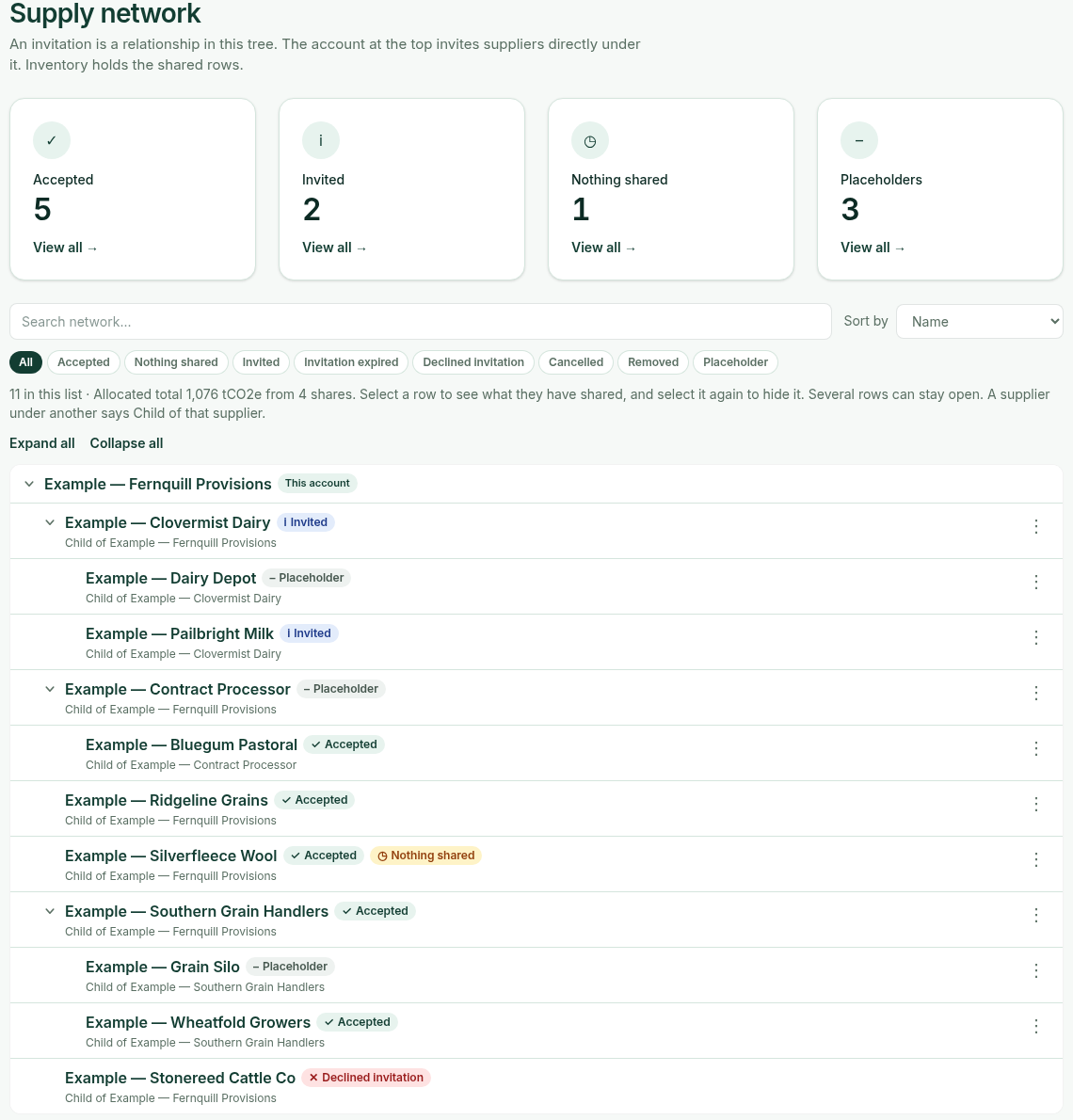
1. Build your supply network
Invite your immediate suppliers for a paid financial year that has an available seat, and track each invitation’s status. A waiting invitation holds a seat on that year, and on the following year when that following year is paid.
2. Export with a clear record
You can export the accepted shares you can still use for that paid financial year, including a deleted share until you accept the deletion. After you accept it, the figures leave and it shows as “Deleted by supplier”. Exports are recorded in the audit trail. Use the export as an input to your own measurement. It is not a completed report.
3. Work with the file in your own process
Take the export into your own emissions measurement. Supplier Share does not complete your inventory or your report.
Request accessWhat you can rely on
Fixed versions
A supplier’s edit creates a new version. Figures you already hold are not overwritten.
Hidden until paid
Figures for a financial year appear only once that year is marked paid. Supplier names may appear before then, so you can trim your list.
A note for suppliers
Suppliers join when you invite them. Sharing a result with a buyer who invited them does not require a licence.
Read the page for suppliers →Bring your suppliers’ results into one place
Request access to start, or log in if your organisation already has access.